Configuring Workstation with a Cash Register
and Key Definition in Web
In this document we will walk
you through the process of setting up each cash register and key set. If at any
time you find yourself in need of additional support, please contact our
Technical Consultants at support@peakinfo.com or 801-572-3570 x2.
Prerequisites:
You must have the Point-of-Sale module. If you have the POS module you
will want to customize your key definitions prior to configuring the cash
register and key definitions.
This Document will cover:
ü
Configuring
Cash Register and Key Definition
Configuring Cash Register and Key
Definition
To configure a workstation with the default or a
specifically defined Cash Register click the cog in the upper right-hand corner
of your screen  ,
then select [Workstation Configuration].
,
then select [Workstation Configuration].
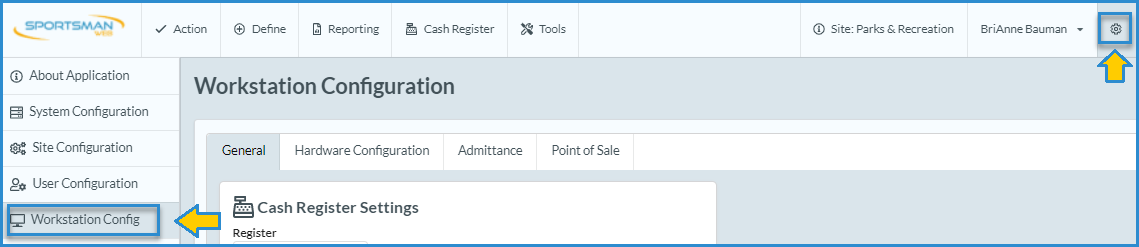
This will take you to the Workstation Configuration screen. All of the settings in the
workstation configuration are local settings. You will need to configure cash
register settings each time you access Sportsman Web from a different computer
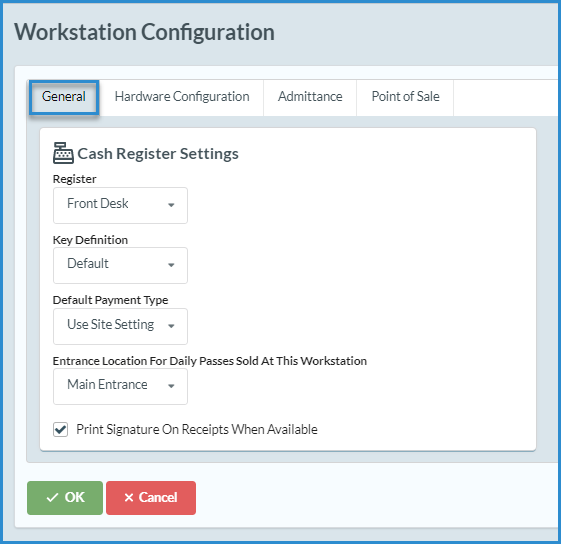
or device. From the General tab
choose a Register, Key Definition, Default Payment Type, and Entrance Location
for Daily Passes from the drop downs and click [OK].
Please note the
following:
· The internet register is where the online sales go if
you have the ActivityReg online registration module and should not be used for
any other sales.
· The starting Key Definition is “Default” which will be
the only selection if you have not defined other Cash Register Key Definitions.
This is the only choice if you do not have the Point-of-Sale module.
SM:CR/POS:B:Apr22